


How to activate the Trial License?
The Trial license is automatically activated when any of the MBS dialog is open for the first time.
- The license will be valid for 7 days from the time of activation and gives access to Full features of the Plugin.
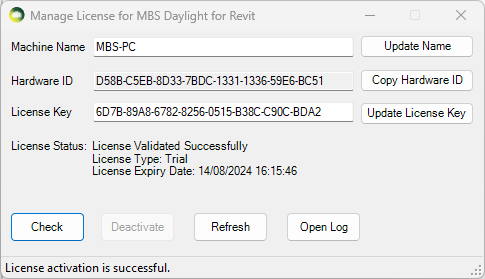
To Check the status of the Trial License
- Open MBS Calculation Dialog then Click on Help Menu > Manage License
- Press Check
How to upgrade to the Subscription License?
- Once you purchase a Subscription license from MBS, We will provide you with a Subscription version License key.
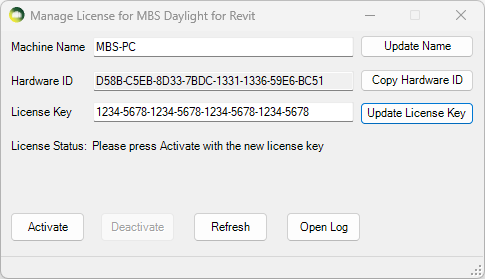
- Open MBS Calculation Dialog then Click on Help Menu > Manage License
- Paste the new key to the License Key textbox and Press Update.
- Press Activate. (Internet connection is required).
- The software validates the license regularly with our license server to allow the license to be used on multiple computers.
- Sometimes the firewall or anti-virus restrictions can block the license activation and validation. Contact us for details about the license server address which the IT team might need in order to allow the activation.
* The plugin can be installed and used on multiple computers. There is a 30 min cooling off period once the plugin is used on one computer before it can be used on another computer.
How to transfer the software license to another computer?
- The plugin can be installed and used on multiple computers.
- There is a 30 min cooling off period once the plugin is used on one computer before it can be used on another computer.
- If the plugin needs to be used before the cooling off period, the license needs to be de-activated from the computer where it was last used.
- Open MBS Calculations Dialog then Click on Help Menu > Manage License.
- Press Deactivate
- Once it is de-activated, it can be used immediately on another computer.